A better Markdown editor
This update makes Markdown pastes easier to write, edit, share, and revisit.
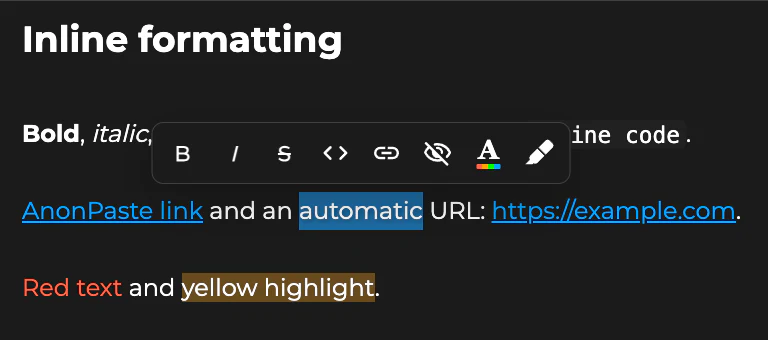
Format selected text
Selecting text in the Visual editor now opens a compact formatting menu beside your selection.
You can quickly apply bold, italic, strikethrough, inline code, links, spoilers, text colours, and highlights without returning to the main toolbar.
More reliable spacing
Single line breaks and intentional empty lines are now preserved more consistently from the editor to the finished paste.
Quick and Rich pastes also share the same Markdown presentation, so your finished paste more closely matches what you saw while editing.
Cleaner copying
Copying a Markdown paste now keeps familiar formatting such as headings, lists, links, emphasis, quotes, tables, and code, while leaving out AnonPaste-only display formatting.
Unsaved changes warning
When editing an existing Quick or Rich paste, AnonPaste now warns you before leaving with unsaved changes.
Fixes and improvements
This release also includes fixes and improvements for Markdown previews, blank lines, editor menus, formatting consistency, and paste management.